
Geneva Forecasting™ API & MCP
REST API, Python SDK, and MCP server access to the Oracle-licensed Geneva Forecasting™ Engine for developers and AI agents.
Key features
10 methods, automatic selection
The expert system tests regression, exponential smoothing, Holt-Winters and Croston against each series, tunes parameters, and returns the best fit. Or pick a method yourself.
Prediction intervals
Set a confidence level and get calibrated upper and lower bounds for every forecast period.
Fit metrics on every call
Each response includes the selected method plus MAPE, MAD and RMSE, so you can judge the forecast before you use it.
Batch forecasting
Send many series in one request and get per-series results. Available on Developer and higher plans.
Python SDK
pip install geneva-forecastgives you a typed client, batch helpers and built-in charting. Python 3.9+.MCP server for AI agents
geneva-mcplets Claude and other MCP clients run forecasts in conversation and get back the numbers plus a chart.
From the Geneva Developer Portal to Claude and executive workbooks
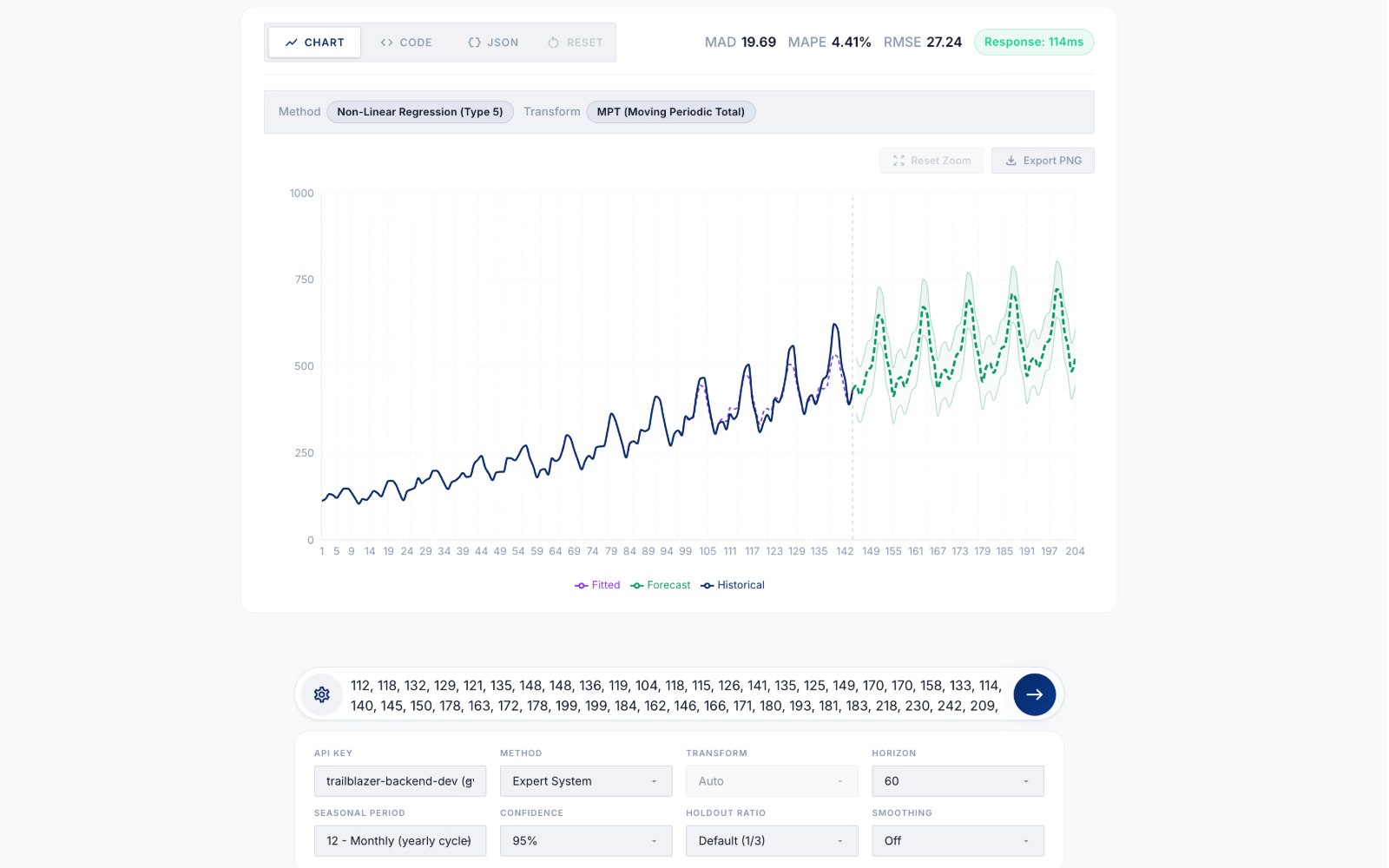
Forecast Playground
Test any time series in the browser before writing code. Inspect the selected method, seasonal transform, 95% prediction interval, holdout accuracy, and sub-200ms response time.
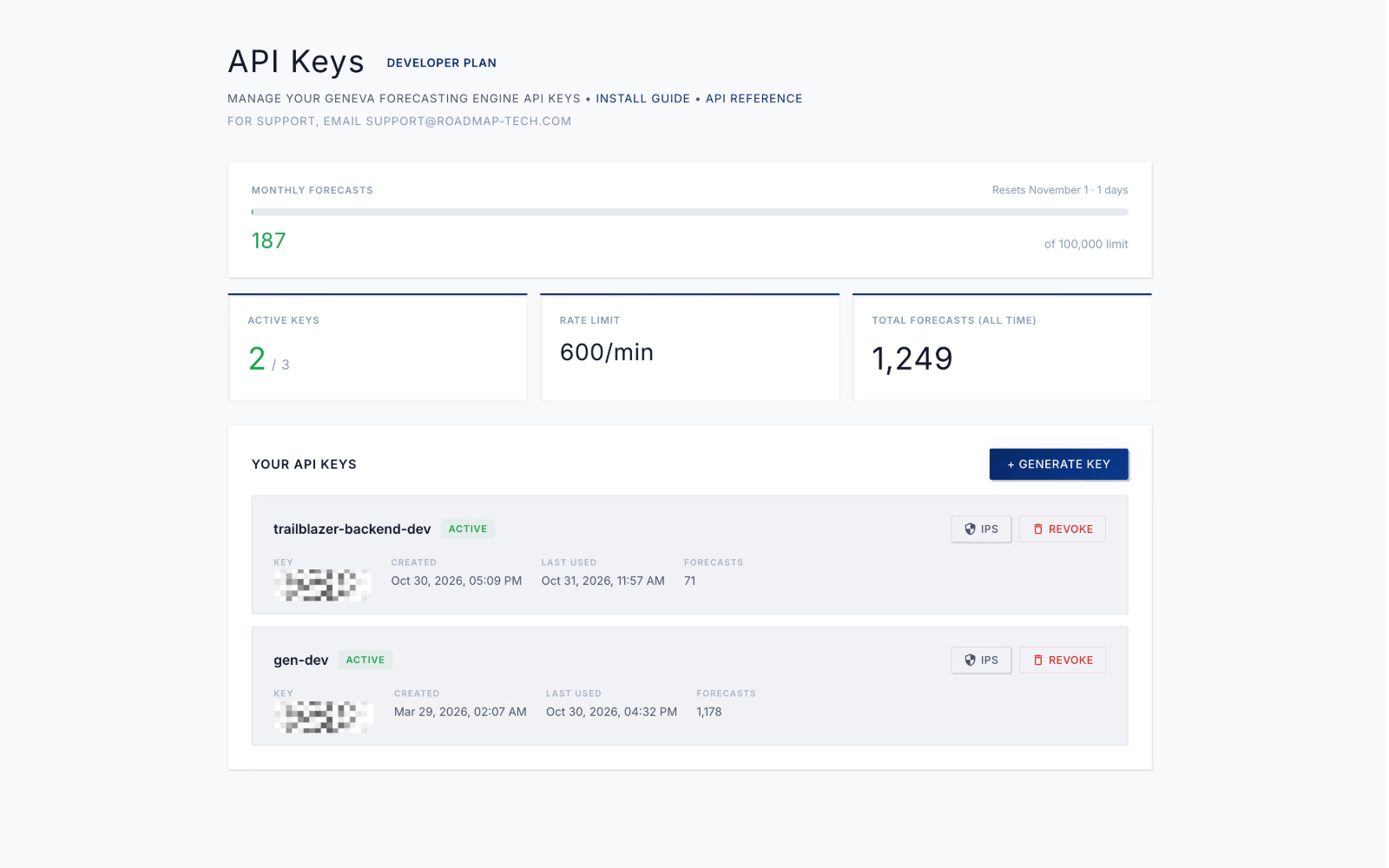
API Key Management
Create and manage API keys in the Geneva Developer Portal with real-time monthly usage tracking, rate-limit visibility, and IP allowlisting.
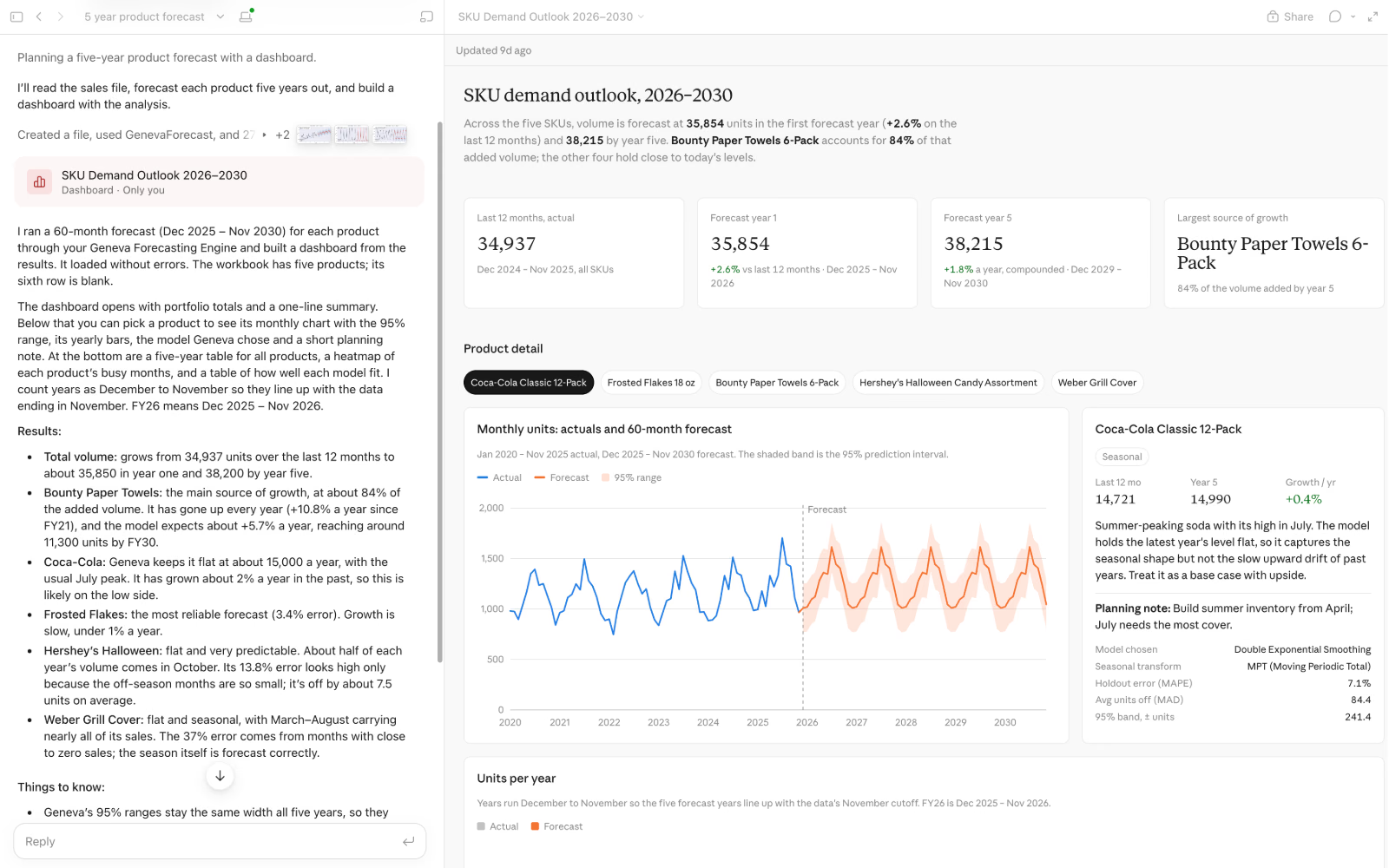
Geneva MCP with Claude Dashboard
Connect the geneva-mcp server to Claude to forecast multi-SKU workbooks in plain language and generate interactive 5-year demand outlook dashboards.
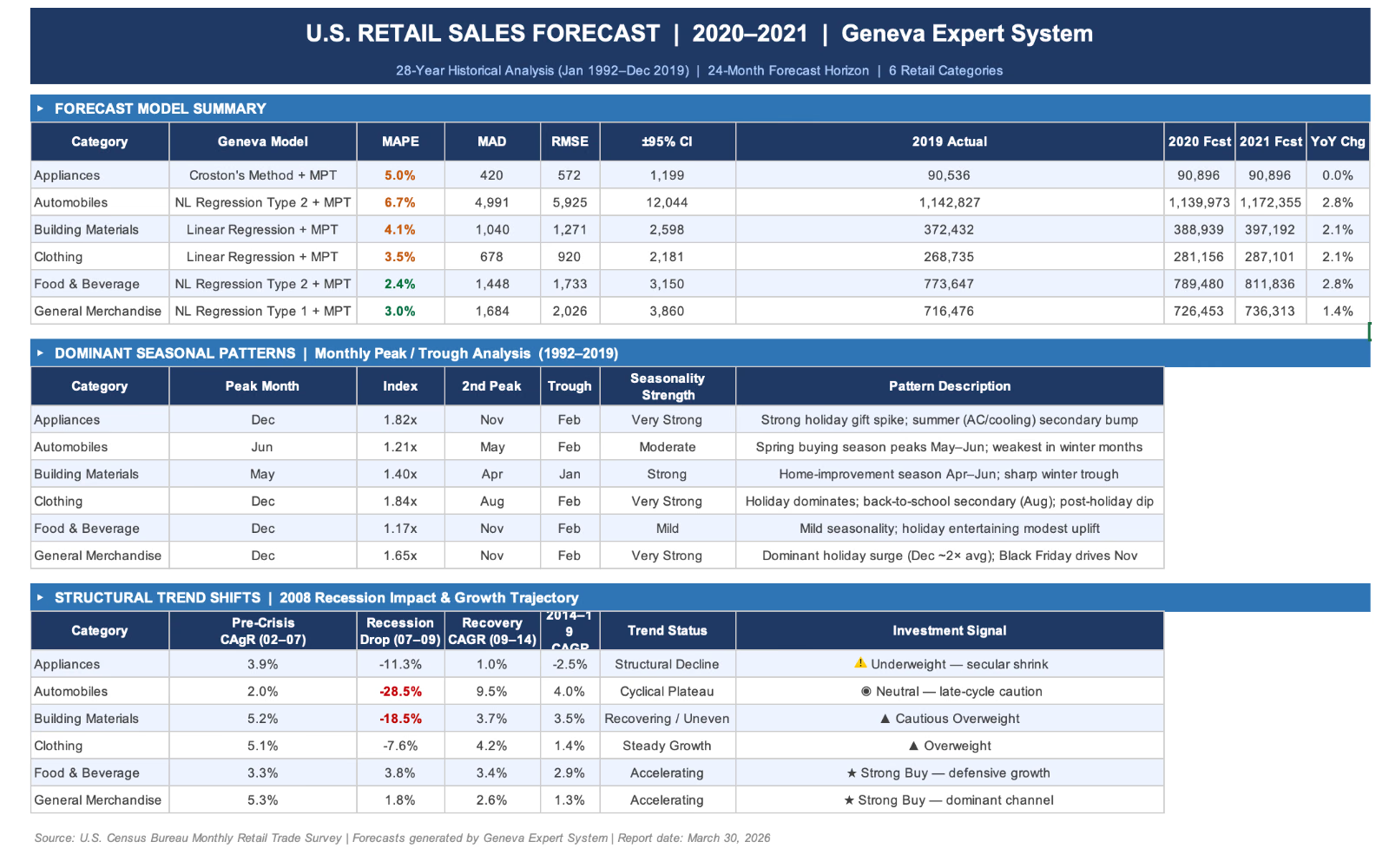
Geneva MCP & Claude-Made Excel Workbook
Go from a single prompt to an executive-ready Excel report complete with Geneva model selections, holdout accuracy, seasonal peak/trough analysis, and structural trend shifts.
Forecast in a few lines
Call the REST endpoint directly, use the Python SDK, or give Claude the Geneva MCP server.
forecast.py
# pip install geneva-forecast
import os
from geneva_forecast import GenevaClient

client = GenevaClient(
    api_url="https://api.roadmap-tech.com",
    api_key=os.environ["GENEVA_API_KEY"],
)

monthly_sales = [112.0, 118.4, 132.1, 124.3, 121.1, 140.2,
                 148.9, 153.7, 136.2, 119.0, 104.0, 118.5]  # your history

result = client.forecast(
    data=monthly_sales,
    horizon=12,                # periods ahead
    wave_periods=[12],         # monthly seasonality
    confidence_level=0.95,
    include=["forecast", "prediction_intervals", "metrics", "model_info"],
)

print(result.model_info.method_name)
print(f"MAPE: {result.metrics.mape:.2f}%")
for pt in result.prediction_intervals:
    print(pt.period, round(pt.forecast, 2), [round(pt.lower, 2), round(pt.upper, 2)])
curl -X POST https://api.roadmap-tech.com/forecast \
-H "X-API-Key: $GENEVA_API_KEY" \
-H "Content-Type: application/json" \
-d '{
"data": [112.0, 118.4, 132.1, 124.3, 121.1, 140.2, 148.9, 153.7,
136.2, 119.0, 104.0, 118.5, 121.3, 129.8, 138.5, 146.7,
128.4, 155.3, 162.8, 149.1, 141.7, 119.5, 108.2, 126.3],
"forecast_horizon": 12,
"wave_periods": [12],
"confidence_level": 0.95
}'claude_desktop_config.json
{
  "mcpServers": {
    "geneva": {
      "command": "uvx",
      "args": ["geneva-mcp"],
      "env": {
        "GENEVA_API_URL": "https://api.roadmap-tech.com",
        "GENEVA_API_KEY": "gva_your_key_here"
      }
    }
  }
}
Get started in 3 steps
From sign-up to your first forecast in a few minutes.
- Create a key. Sign up at the Geneva Developer Portal and generate an API key. The free tier needs no credit card.
- Install the SDK.
pip install geneva-forecast - Forecast. Send a series and get back the forecast, intervals and fit metrics.
Performance
The same engine that ships inside Oracle Database.
- Average latency
- < 200 msper forecast via the API
- Throughput
- 1,500+/sforecasts on enterprise deployments
- Hardware
- CPU-onlyoptimized C++, no GPUs
- Granularity
- 15-min → annualsub-hourly to long-range planning
Pricing
Start free with 1,000 forecasts a month. No credit card.
Free
$0/mo
- Forecasts
- 1,000 forecasts / mo
- Rate limit
- 120 requests / min
- No credit card
- MCP access
- All 10 methods + auto-select
- No batch
Developer
$49.99/mo
- Forecasts
- 100,000 forecasts / mo
- Rate limit
- 600 requests / min
- Batch forecasting
- Full API
- MCP access
- Prediction intervals
Business
$199.99/mo
- Forecasts
- 1,000,000 forecasts / mo
- Rate limit
- High volume
- Batch forecasting
- Production workloads
- Priority scale
- MCP access
Enterprise
Custom
- Forecasts
- Unlimited forecasts
- Rate limit
- Custom
- Cloud or on-prem
- Custom integration
- Data sovereignty
- Dedicated support
Built on the engine inside Oracle
Geneva isn’t a new model. It’s the statistical engine Oracle licensed in 1999 and still ships inside Oracle Database 26 OLAP DML. The API gives you the same engine, with the same automatic method selection, as a single HTTPS call.
Integrations
Frequently asked questions
What is Geneva API?
The Geneva Forecasting™ API gives developers direct access to the Geneva Forecasting™ Engine, the statistical engine Oracle has licensed since 1999. Send a time series and get back a forecast with prediction intervals, the selected method and fit metrics (MAPE, MAD and RMSE), in under 200 ms on average.
How much does the Geneva Forecasting™ API cost?
The Free plan includes 1,000 forecasts a month with no credit card. Developer is $49.99 a month for 100,000 forecasts, Business is $199.99 a month for 1,000,000, and Enterprise is custom.
Which programming languages can I use?
Any language that can make an HTTPS request with JSON. There is an official Python SDK, geneva-forecast, and an MCP server, geneva-mcp, for AI agents.
Can Claude use the Geneva API?
Yes. Install the geneva-mcp server, add your API key to your Claude Desktop configuration, and Claude can run forecasts in conversation and get back the numbers and a chart.
How fast is the API?
Under 200 ms per forecast on average, and 1,500+ forecasts per second on enterprise deployments.
Does the API support batch forecasting?
Yes, on the Developer, Business and Enterprise plans. Send many series in one request and get typed per-series results.