
RoadMap TrailBlazer
AI forecasting workspace in the browser with 40+ models, an interactive spreadsheet, and plain-language AI agents for planning teams.
Free forever with the Geneva Engine · Upgrade to Pro ($34.99/mo) or Max ($69.99/mo) for 40+ models
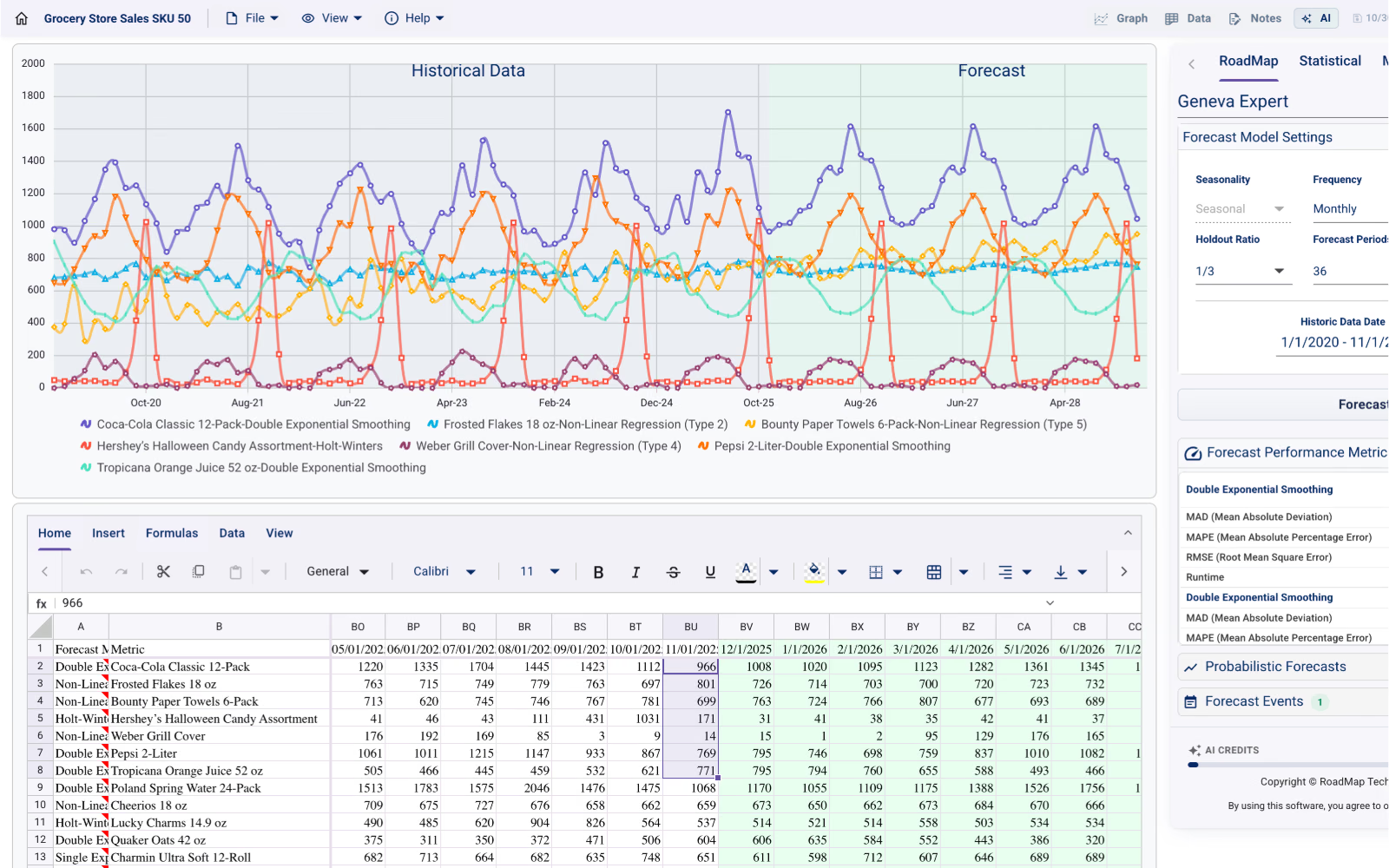
Everything you need to forecast, in one interface
From data import to executive-ready insight. No scripts, no infrastructure, no data engineering, and the full workspace is included on the Free plan.
40+ Forecasting Models
Benchmark RoadMap Geneva, classical statistical, machine learning, deep learning, and TimeGPT foundation models side by side. Automatic model selection identifies the optimal fit for your data.
AI Forecast Analyst
Ask questions about your forecast in plain language. Receive chart-aware explanations of trends, seasonal peaks, anomalies, and strategic recommendations.
AI Data Import Agent
Upload any raw CSV and guide the ETL import with natural-language instructions, with optional AI code execution to normalize, filter, and structure large datasets automatically.
Interactive Spreadsheet
Full Excel-function support directly in the browser. Manage dozens of SKUs, inspect each row's selected model, and edit or validate data with no export required.
Conformal Prediction & Event Monte Carlo
Generate calibrated 80%, 90%, or 95% conformal prediction intervals and run Monte Carlo simulations for discrete events like promotions or loss of exclusivity.
Save, Share and Collaborate
Persist forecasts to the cloud, share live spreadsheets with your team, and export native Excel workbooks or presentation-ready charts.
Inside the TrailBlazer workspace
Six views of the live browser workspace: from natural-language CSV import and multi-SKU spreadsheets to conformal intervals and Monte Carlo event modeling.
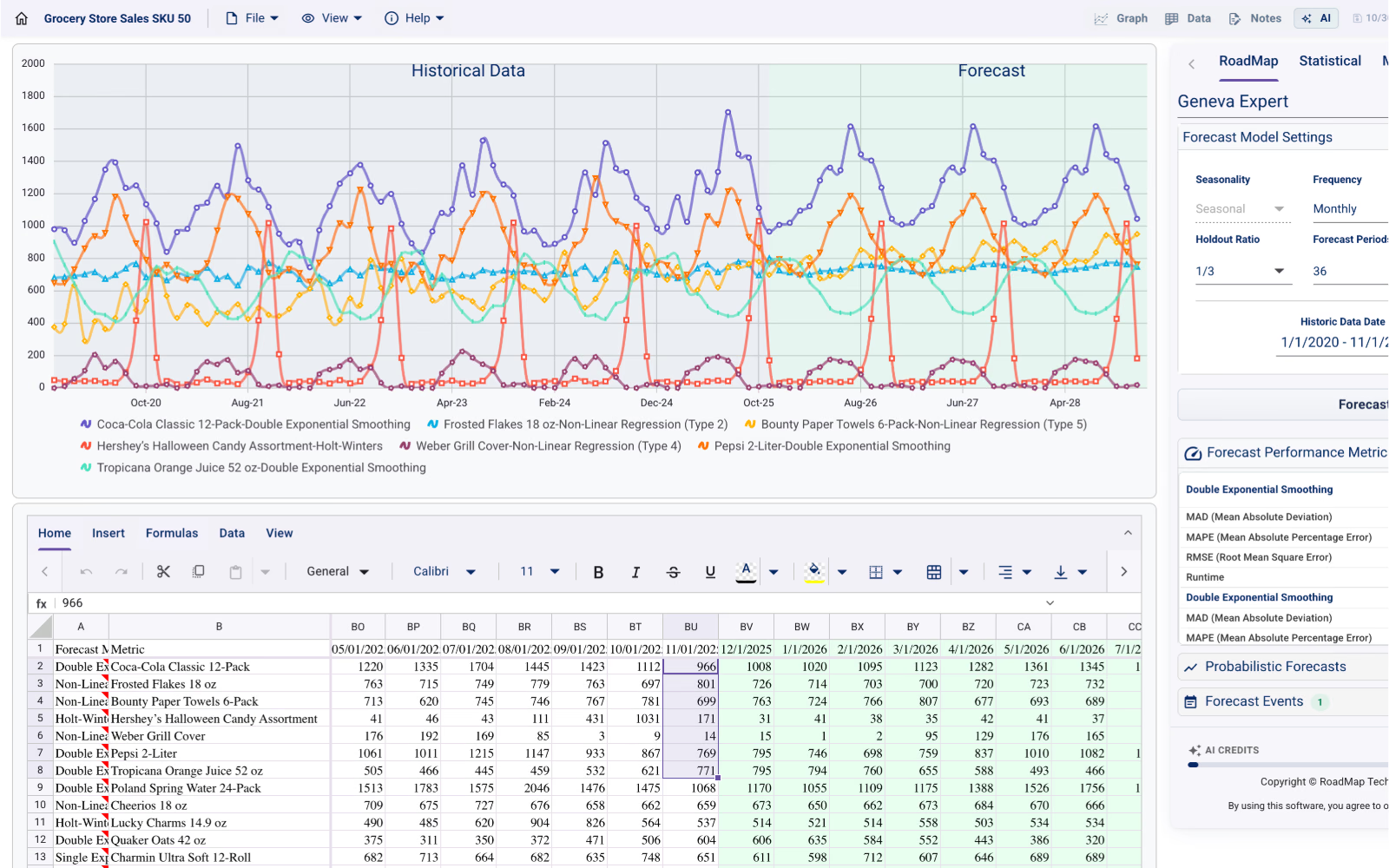
Forecasting Workspace
Plot multiple SKUs simultaneously, configure holdout ratios and forecast horizons, and inspect out-of-sample error metrics (MAD, MAPE, RMSE) beside your grid.
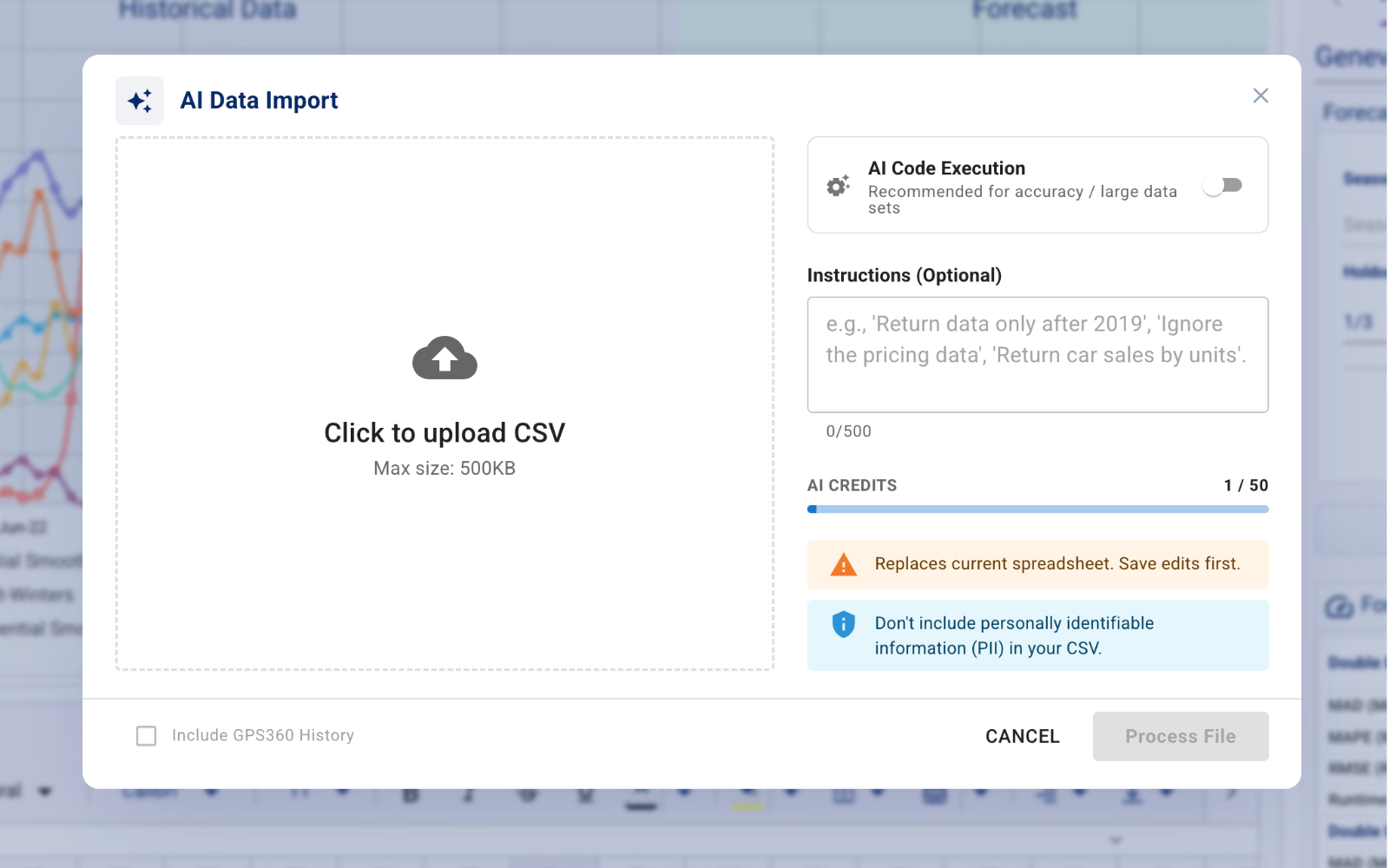
AI Data Import Agent
Upload any raw CSV and guide the import with plain-language instructions, with optional AI code execution to normalize and structure large datasets.
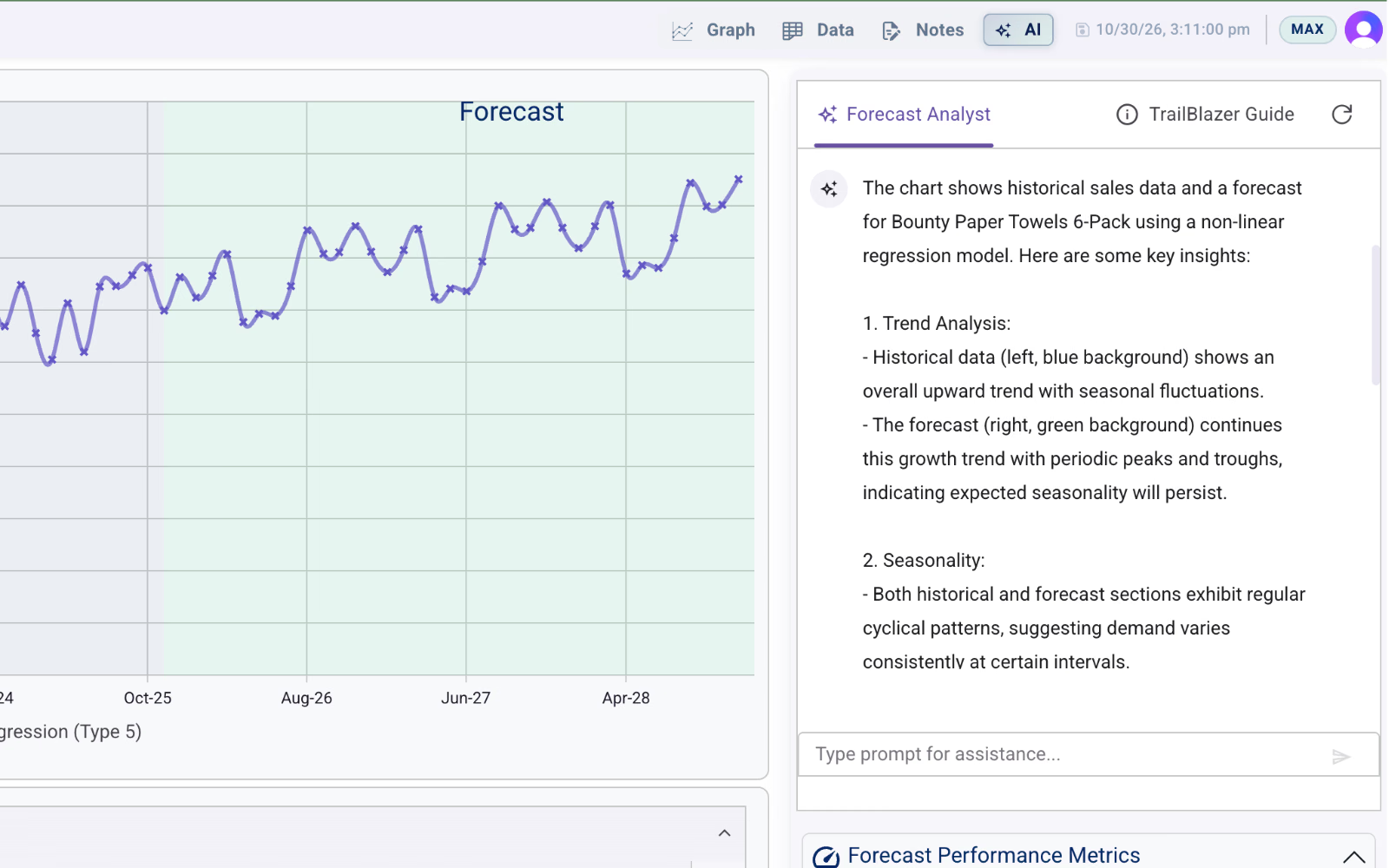
AI Forecast Analyst
Docked beside your chart, the analyst explains historical trends, cyclicality, and forecast behavior in plain language grounded in your series.
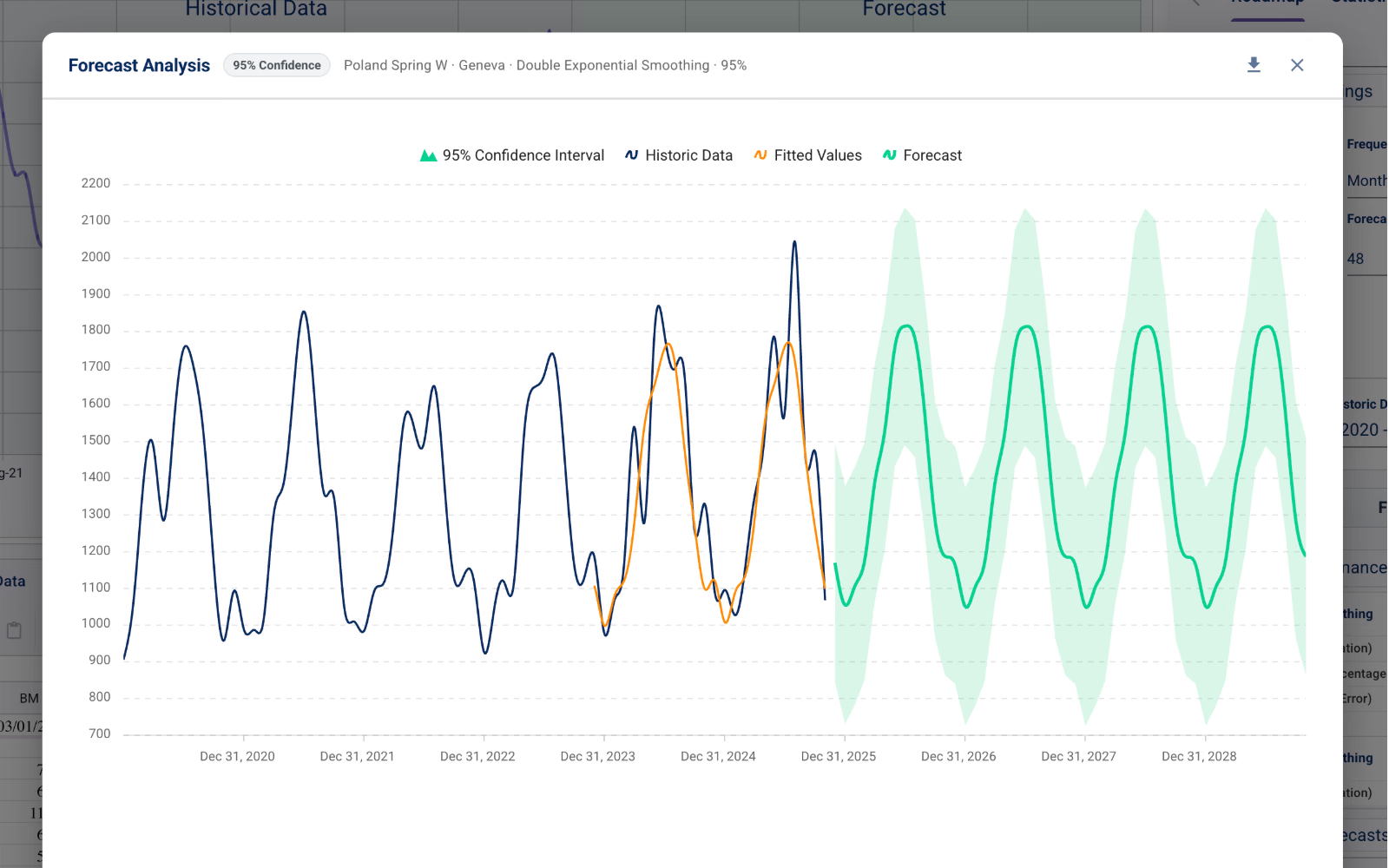
Conformal Prediction Intervals
Generate calibrated 80%, 90%, or 95% confidence bands around any forecast to quantify upside and downside inventory risk before committing stock.
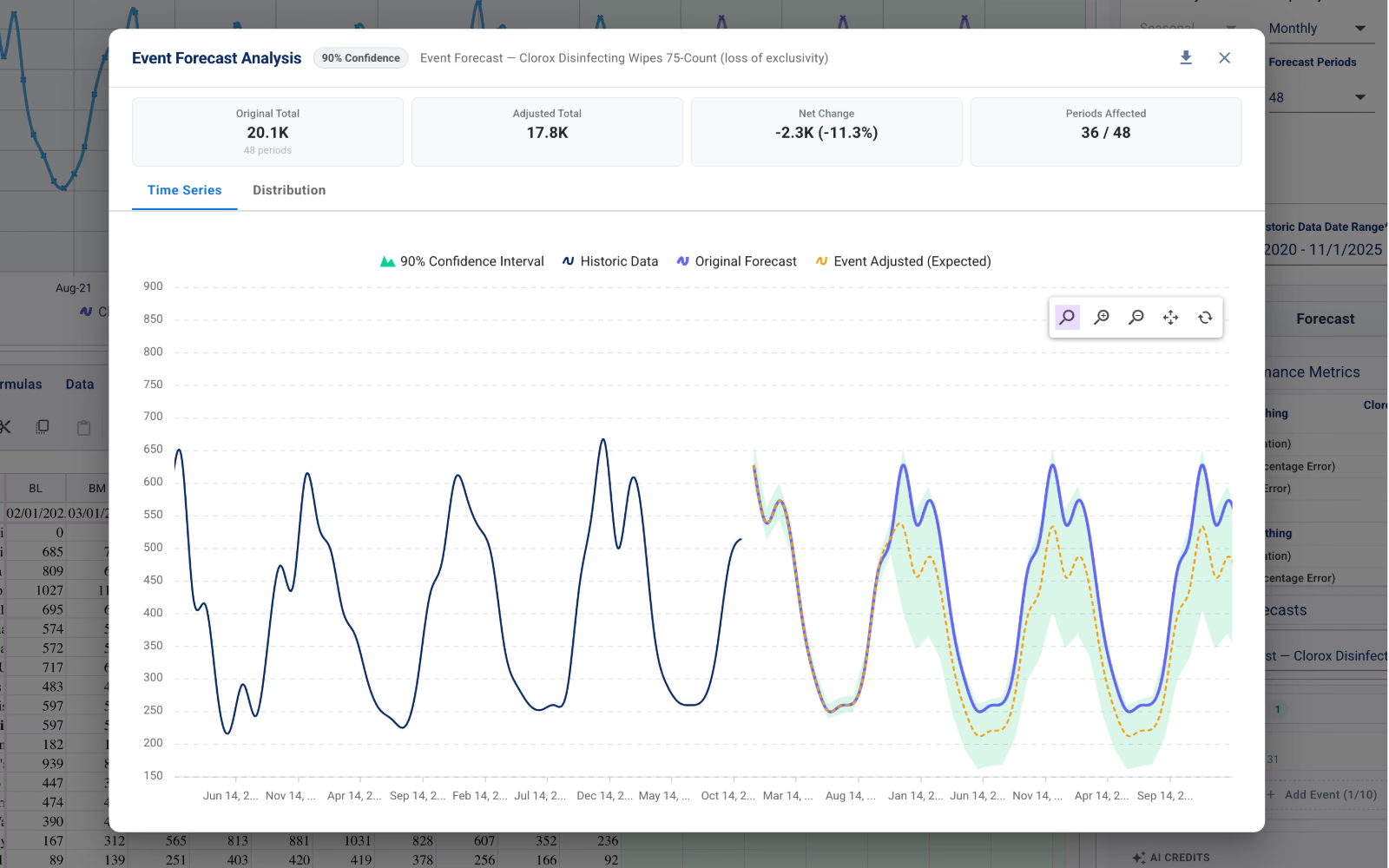
Event-Based Forecast with Monte Carlo
Model discrete events like promotions, supply disruptions, or loss of exclusivity with Monte Carlo simulations and see the net unit and percentage impact across periods.
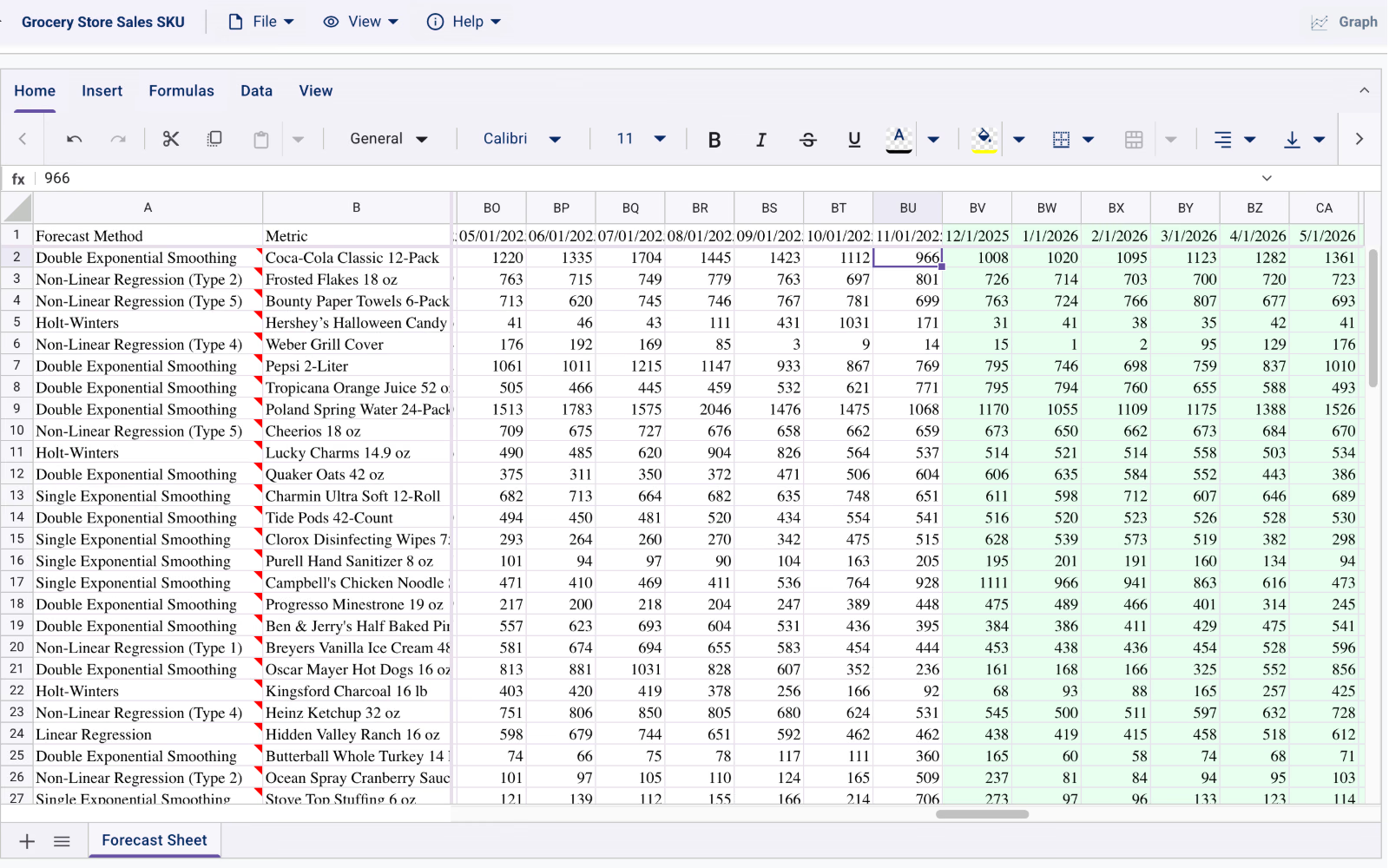
Interactive Spreadsheet
Manage dozens of SKUs in a full-featured, Excel-compatible grid that displays each item’s selected forecast method, historical actuals, and future periods side by side.
40+ algorithms across five paradigms
Benchmark every approach automatically. Start free with the RoadMap Geneva Forecasting™ Engine, or unlock classical statistical, machine learning, deep learning, and TimeGPT foundation models.
- Geneva Expert
- Linear Regression
- Non-Linear Regression I–V
- Single Exponential Smoothing
- Double Exponential Smoothing
- Holt-Winters
- Croston's
- Auto ARIMA
- Auto ETS
- Auto Theta
- Auto CES
- Damped ETS
- Holt-Winters
- Holt
- Optimized SES
- Seasonal Naive
- GARCH
- Croston's (Classic + Optimized)
- Meta Prophet
- LightGBM
- XGBoost RF
- AdaBoost
- K-Nearest Neighbors
- Support Vector Regression
- Decision Tree
- Ridge
- Lasso
- Elastic Net
- Kernel Ridge
- Gaussian Process
- NHITS
- NBEATS
- LSTM
- GRU
- RNN
- Dilated RNN
- Dilated LSTM
- TCN
- MLP
- TimeGPT-1
- TimeGPT-1 Long Horizon
- TimeGPT-2
- TimeGPT-2 Mini
- TimeGPT-2 Pro
- TimeGPT-2.1
Model access by plan
The Free plan is a complete forecasting workspace, not a time-limited trial. Every tier includes the full platform and the RoadMap Geneva Forecasting™ Engine. Upgrade to Pro or Max at any time to unlock additional model categories.
| Model Category | Free$0 | Pro$34.99/mo | Max$69.99/mo |
|---|---|---|---|
| RoadMap Models (Geneva Forecasting™ Engine)7 models | Included in Free | Included in Pro | Included in Max |
| Statistical Models12 models | Not included in Free | Included in Pro | Included in Max |
| Machine Learning Models11 models | Not included in Free | Included in Pro | Included in Max |
| Deep Learning Models9 models | Not included in Free | Not included in Pro | Included in Max |
| Foundation Models (TimeGPT)6 models | Not included in Free | Not included in Pro | Included in Max |
- Full workspace and AI agents on every plan
- Holdout error scoring (MAD, MAPE, RMSE)
- Native Excel (.xlsx) and CSV import/export
- Cloud save and live team sharing
From raw CSV to executive-ready forecast with zero setup
Most demand planners spend more time cleaning exports and fixing broken spreadsheet formulas than evaluating forecasts. TrailBlazer removes the data-engineering bottleneck so your team can go from a raw ERP or POS export to a calibrated, defensible forecast in minutes:
- Drop in any raw file. The AI Import Agent inspects your CSV or Excel upload, detects date and metric columns, normalizes formatting, and structures each time series into the browser grid automatically.
- Work in a familiar Excel-compatible spreadsheet. Use standard Excel formulas, format cells, and build side-by-side scenario rows directly in the browser without exporting back and forth.
- Validate accuracy on holdout data before committing. Configure holdout ratios (such as
1/3of history), toggle automatic outlier filtering, set forecast horizons and confidence levels (80%,90%,95%), and inspect out-of-sample MAD, MAPE, and RMSE alongside sub-second runtimes. - Interrogate and share. Ask the docked AI Forecast Analyst to summarize drivers or explain anomalies, save your workspace to the cloud, or export native Excel workbooks and presentation-ready charts for S&OP review.
Built on the Geneva Engine, with a clear path to enterprise scale
Unlike black-box SaaS tools that gate core workflow features behind expensive seats, TrailBlazer’s Free plan gives you the entire workspace plus the Geneva Forecasting™ Engine, the same expert-system statistical engine Oracle has licensed since 1999. When a series calls for specialized architectures, upgrading to Pro unlocks classical statistical (Auto ARIMA, Auto ETS, Meta Prophet, GARCH) and machine learning (LightGBM, XGBoost RF, Gaussian Process) models, while Max adds neural networks (NHITS, NBEATS, LSTM, TCN) and TimeGPT foundation models.
When your team is ready to automate forecasting inside internal pipelines or scale into cross-functional enterprise planning, the exact same forecasting foundation is available through the Geneva Forecasting™ API & MCP server, RoadMap GPS, and RoadMap GPS 360.
Frequently asked questions
What is included in the free version of TrailBlazer?
The Free plan ($0) is a permanent, full-featured workspace, not a time-limited trial. It includes the RoadMap Geneva Forecasting™ Engine (Geneva Expert, Linear and Non-Linear Regression I–V, Single and Double Exponential Smoothing, Holt-Winters, and Croston's), plus the AI Forecast Analyst, AI Import Agent, Interactive Spreadsheet, Conformal Prediction intervals, Automated Model Selection, and Excel/CSV import and export.
When should I upgrade to TrailBlazer Pro or Max?
Upgrade when you want to benchmark additional algorithm paradigms alongside Geneva. Pro ($34.99/month) unlocks 12 classical Statistical models (including Auto ARIMA, Auto ETS, Meta Prophet, and GARCH) and 11 Machine Learning models (including LightGBM, XGBoost RF, and Gaussian Process). Max ($69.99/month) adds 9 Deep Learning architectures (NHITS, NBEATS, LSTM, TCN, and more) and 6 TimeGPT Foundation Models (TimeGPT-1 through TimeGPT-2.1).
How does the AI Import Agent handle raw CSV or Excel files?
You can upload any raw CSV or spreadsheet without writing ETL scripts or reformatting columns by hand. The AI Import Agent automatically inspects your file, identifies date and value columns, normalizes time series formatting, and validates the data directly into the interactive spreadsheet grid.
What are conformal prediction intervals in TrailBlazer?
Conformal prediction generates statistically calibrated upper and lower bounds (such as 80%, 90%, or 95% confidence ranges) around your point forecast. Instead of relying on textbook normality assumptions that often fail on real-world SKUs, conformal intervals use actual holdout residuals so planners can see realistic upside and downside inventory risk.
Can we export forecasts back to Excel or presentations?
Yes. Every TrailBlazer plan lets you edit formulas directly in the browser spreadsheet, save live workspaces to the cloud to share with colleagues, export native Excel workbooks (.xlsx) and CSV files, and download high-resolution forecast charts for S&OP decks.